/STRIVR Portal

VR Content Discovery at Enterprise Scale
I designed STRIVR's web based VR content store and broader content discovery system, including developer upload workflows and content detail pages.

Why Include This
Complex B2B problem

Company
STRIVR

Role & Contributions
UX Designer

Team
Cross-functional team (PM, engineering, design)

Year
2023
Challenge
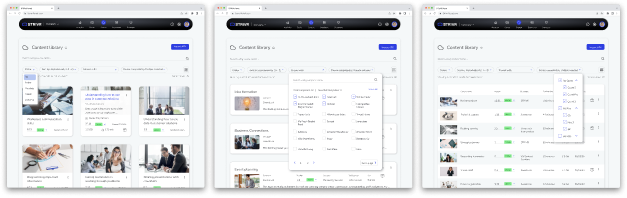
I was tasked with building a digital store for purchasing off-the-shelf VR training modules—but the existing content discovery system was too broken to support it. STRIVR's enterprise VR training portal serves 20+ Fortune 500 clients, yet its five-year-old content section had never been redesigned. A single shared library handled all workflows without role-specific features, creating a heavy support burden.
Outcome

Design was implemented.
Improved content manager satisfaction with details page.
Grew content catalog to 100+ pieces.
Launched Content Store generating $2M+ revenue.
Reduced content management support tickets.

Research & Approach to Designing the Content Store
Understanding Content Manager Needs
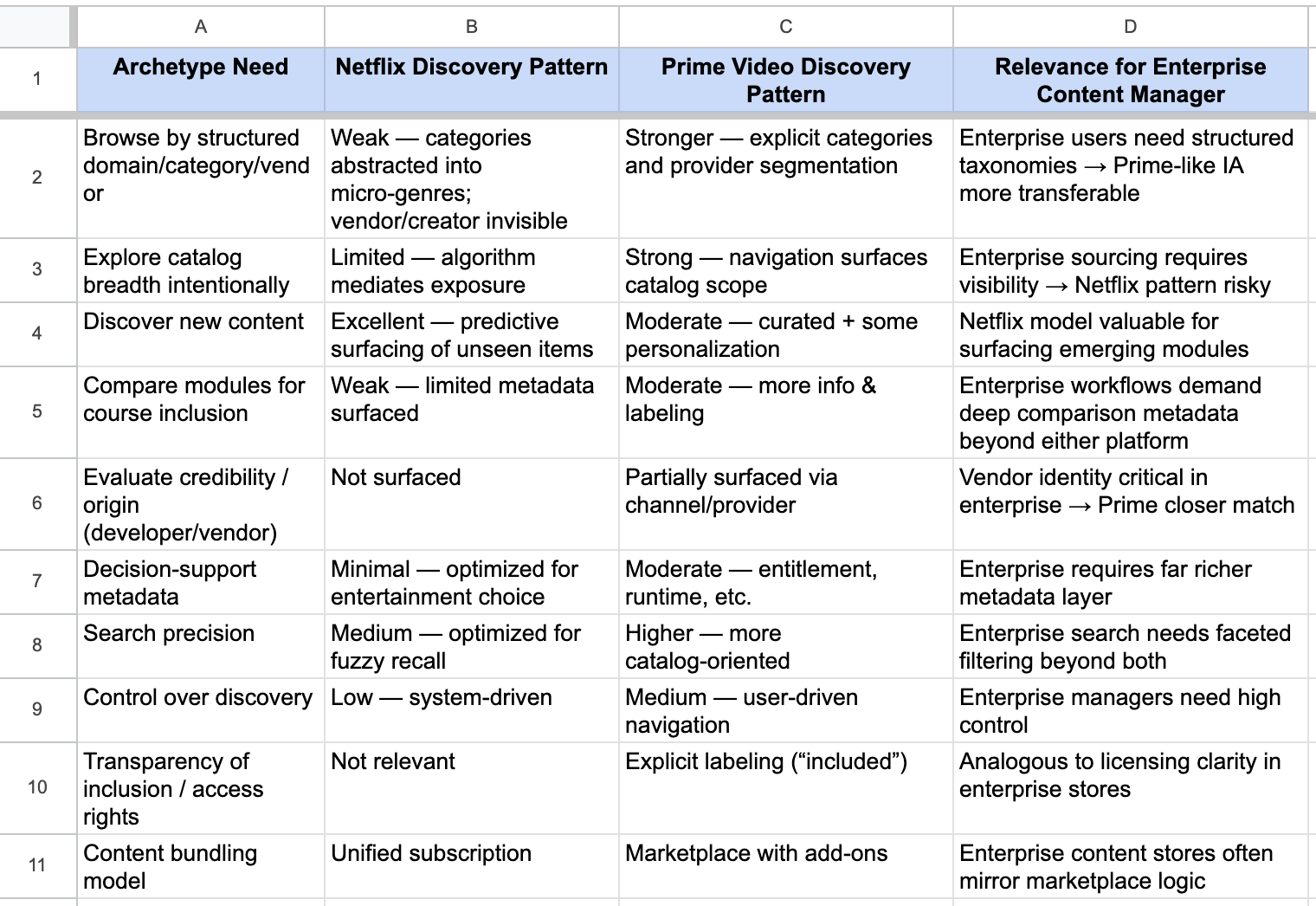
I conducted user interviews with content managers and competitive analysis of streaming platforms (Netflix, Amazon Prime, HBO) and educational marketplaces.
Realizing the Scope
Fixing this required a Portal-wide redesign, including content details and Developer upload workflows. Interviews revealed that Developers wouldn’t add metadata without clear incentives like store visibility and revenue potential.

Developer uploads VR content and adds content details
Developer Content library

Developer publishes content to the store
STRIVR
Content store
Metadata Gaps Impacting Content Managers
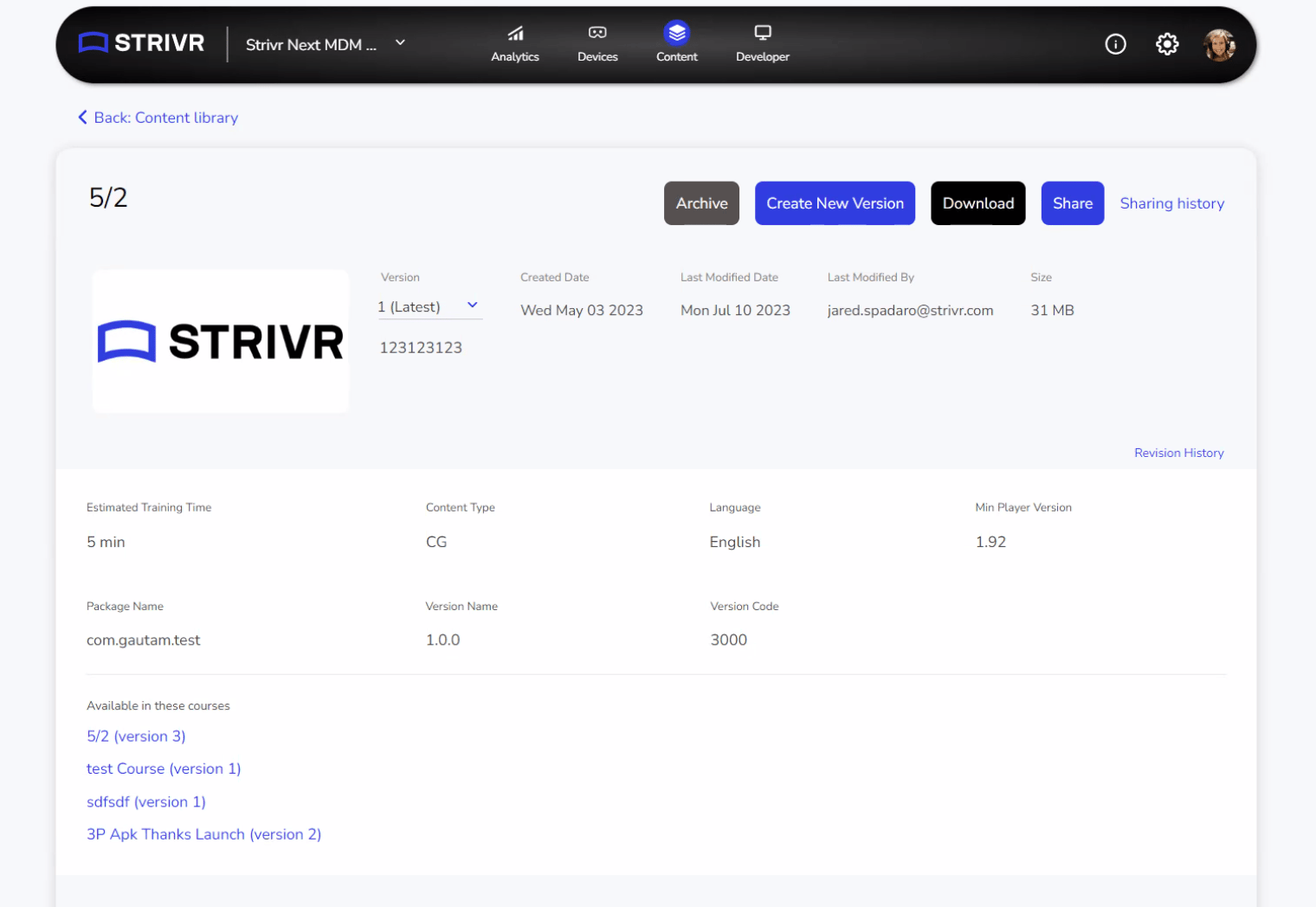
Content Managers needed specific metadata to evaluate and purchase modules, but existing content pages lacked this information.
Old Content Details Page

Mapping Content Workflows: Sharing, Discovery, and Course Building
CONTENT FLOW

Developer uploads VR content and adds content details
Developer Content library


Developer manages content versions

Developer publishes content to content store
STRIVR
Content store


Content Training Manager buys content from content store

Developer shares content with enterprise
Content Training Manager accepts shared content from Developer
Enterprise Content library

Content Training Manager views content
Solutions Team Member views content
Content Training Manager builds courses from content
Solutions Team Member builds courses from content
Enterprise Course library


KEY
Content

Content made for store

Custom content for enterprise
Module


Course


Mapping Three Part Solution
Developer Flow Redesign
Goal: Ensures necessary metadata and content details are available for effective content discovery.
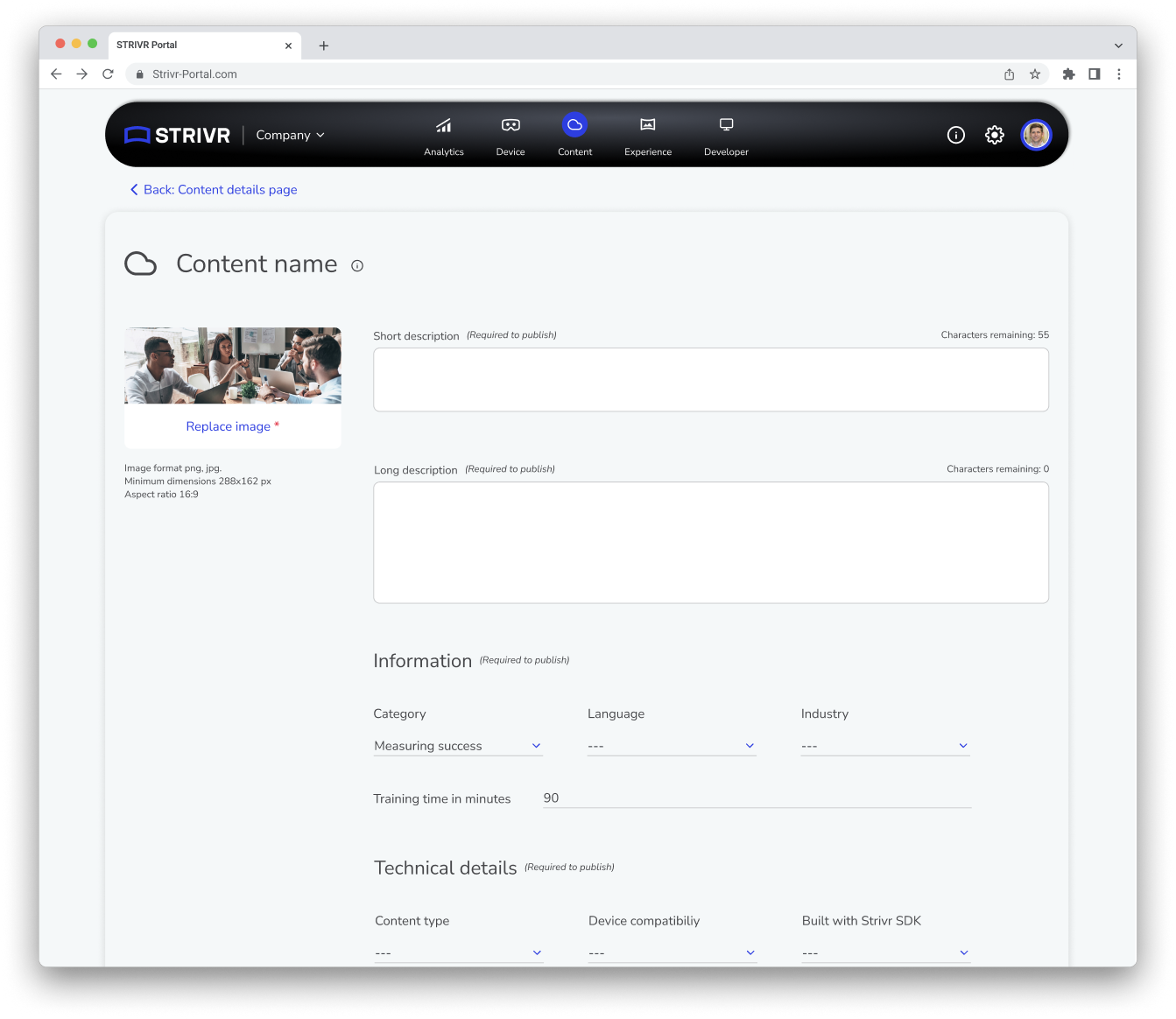
Details Page Redesign
Goal: Creates a structured, user-friendly content page that improves navigation and discovery.
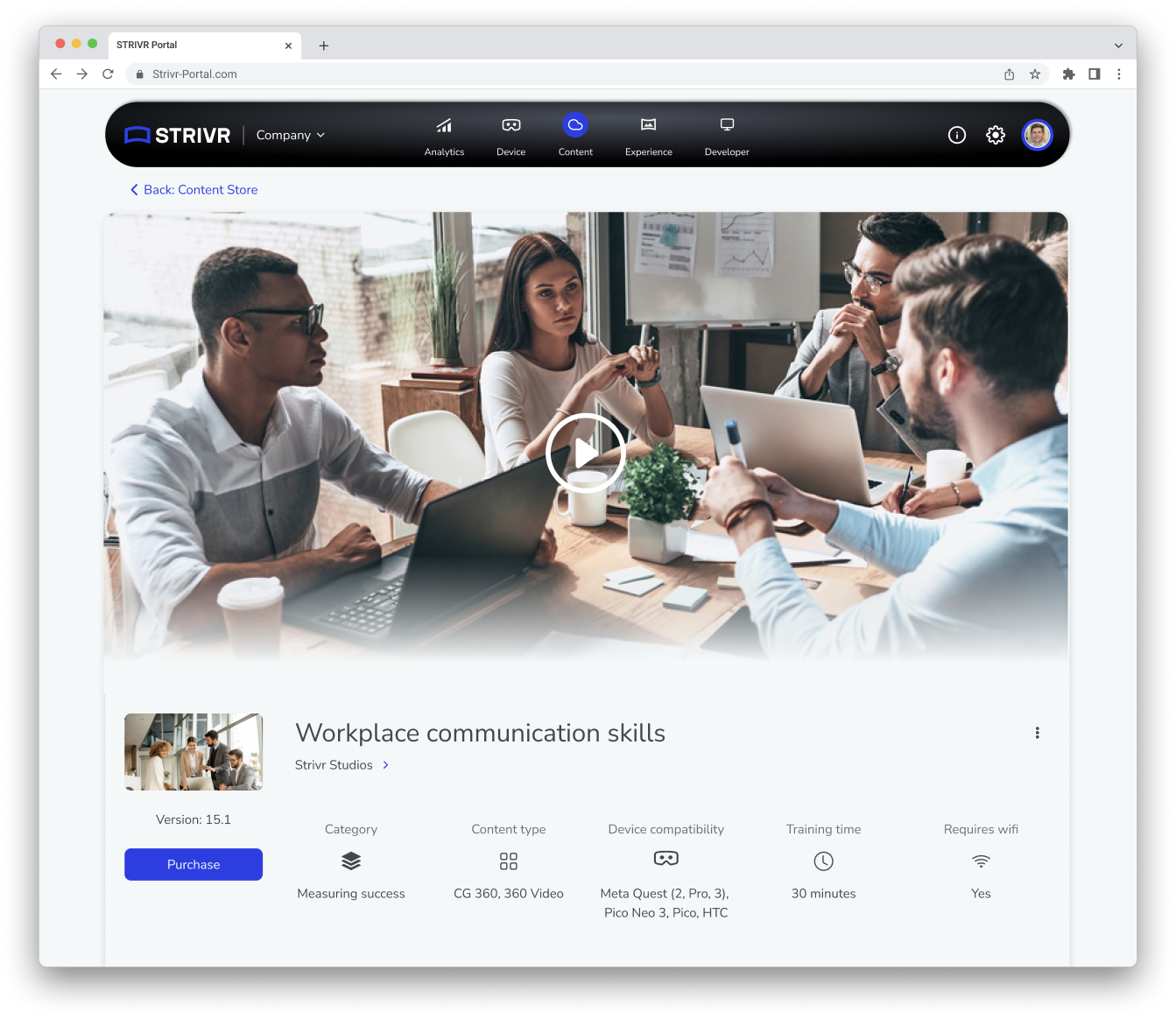
Content Store Design
Goal: Provides an intuitive browsing experience tailored to user requirements and needs.

Leads to: A richer content database that supports the redesigned content details page and content store.
Leads to: Better content organization within the store, helping managers find and assess modules efficiently.
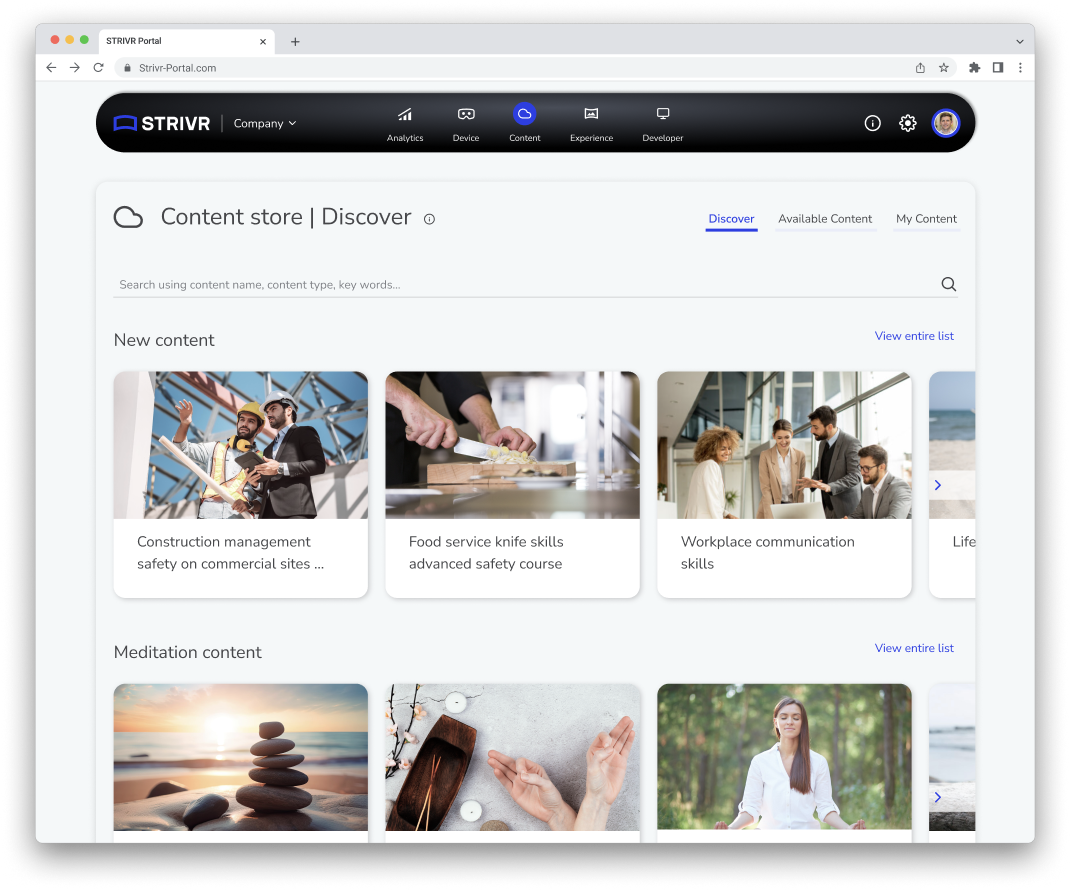
Content Store Design
Discover Tab: Curated category carousels featuring trending and highlighted content.
All Available Content Tab: Full catalog displayed as a content grid with filters and sorting options.
My Content Tab: Purchased content library.
Key Features: Three-tab navigation, hover states, persistent search, developer pages.
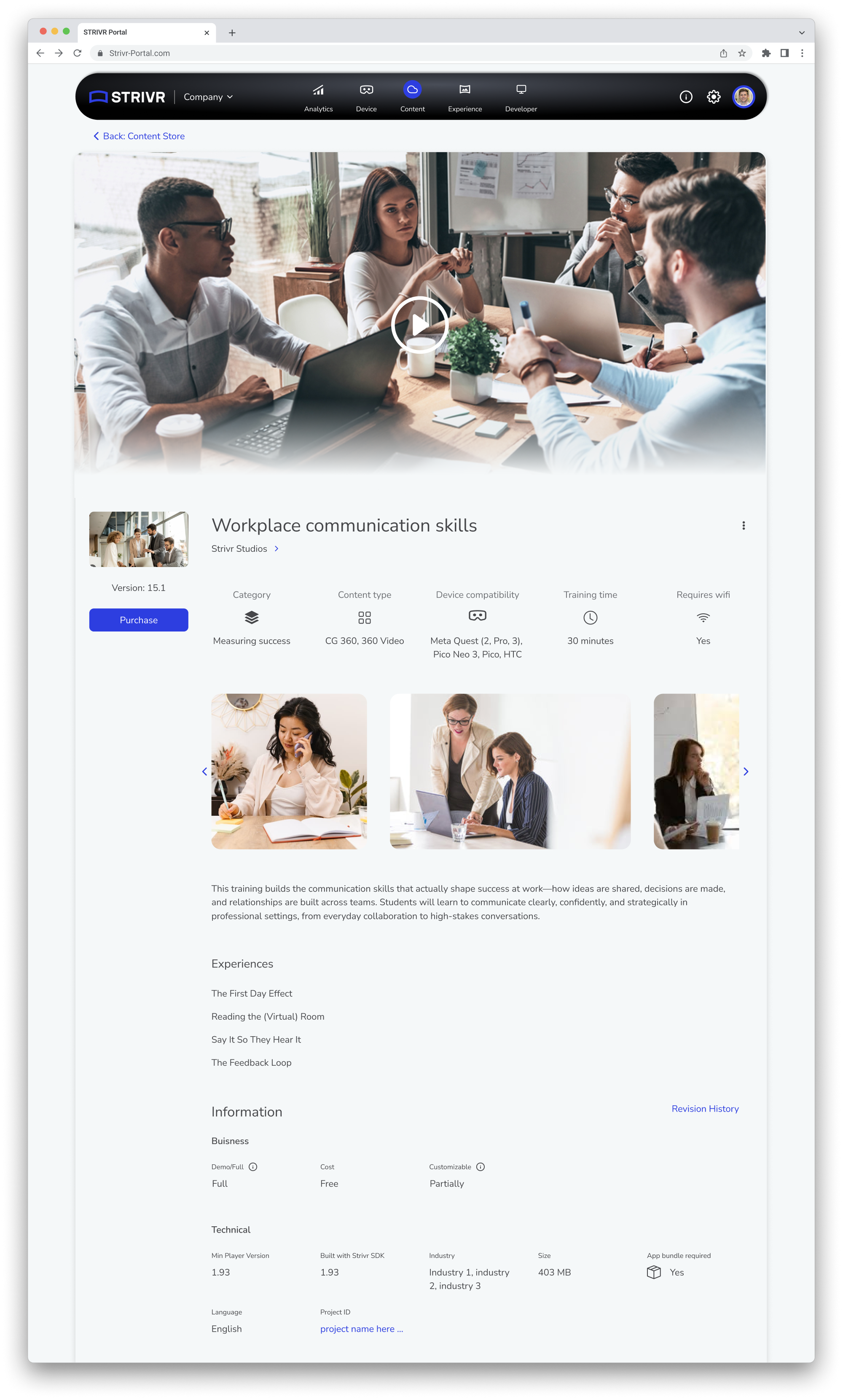
Content Details Page Redesign
Built for content manager discovery needs, not just internal tracking.
Information Hierarchy
- Primary
- Learning
- Business
- Technical
Key Decision: Made preview media optional—developers resisted extra uploads.
Old Content Details Page
New Content Details Page
Developer Flow Redesign
Initial Upload: Import APK, define device compatibility, add name/thumbnail
Adding and Editing Content Details: Add required metadata for store publication and optional supplementary course images and videos.
Version Management: Create new versions only for new APK uploads; metadata updates do not create new versions.
Reflection
Fix the foundation before building the feature. The store required addressing systemic metadata problems first.
User motivation drives adoption. Connecting metadata to revenue motivated developers.
Design for today with infrastructure for tomorrow. Simple start with extensible patterns enabled rapid launch and growth.


Business
Technology
Design
UX
back to case studies
/STRIVR Portal

VR Content Discovery at Enterprise Scale
I designed STRIVR's web based VR content store and broader content discovery system, including developer upload workflows and content detail pages.
Why Include This
Complex B2B problem
Company
STRIVR
Role & Contributions
UX Designer
Team
Cross-functional team (PM, engineering, design)
Year
2023
Challenge
I was tasked with building a digital store for purchasing off-the-shelf VR training modules—but the existing content discovery system was too broken to support it. STRIVR's enterprise VR training portal serves 20+ Fortune 500 clients, yet its five-year-old content section had never been redesigned. A single shared library handled all workflows without role-specific features, creating a heavy support burden.
Outcome
Design was implemented.
Improved content manager satisfaction with details page.
Grew content catalog to 100+ pieces.
Launched Content Store generating $2M+ revenue.
Reduced content management support tickets.

Research & Approach to Designing the Content Store
Understanding Content Manager Needs
I conducted user interviews with content managers and competitive analysis of streaming platforms (Netflix, Amazon Prime, HBO) and educational marketplaces.
Realizing the Scope
Fixing this required a Portal-wide redesign, including content details and Developer upload workflows. Interviews revealed that Developers wouldn’t add metadata without clear incentives like store visibility and revenue potential.

Developer uploads VR content and adds content details
Developer Content library

Developer publishes content to the store
STRIVR
Content store
Metadata Gaps Impacting Content Managers
Content Managers needed specific metadata to evaluate and purchase modules, but existing content pages lacked this information.
Old Content Details Page

Mapping Content Workflows: Sharing, Discovery, and Course Building
CONTENT FLOW

Developer uploads VR content and adds content details
Developer Content library


Developer manages content versions

Developer publishes content to content store
STRIVR
Content store


Content Training Manager buys content from content store

Developer shares content with enterprise
Content Training Manager accepts shared content from Developer
Enterprise Content library

Content Training Manager views content
Solutions Team Member views content
Content Training Manager builds courses from content
Solutions Team Member builds courses from content
Enterprise Course library


KEY
Content
Content made for store
Custom content for enterprise
Module
Course

Mapping Three Part Solution
Developer Flow Redesign
Goal: Ensures necessary metadata and content details are available for effective content discovery.
Details Page Redesign
Goal: Creates a structured, user-friendly content page that improves navigation and discovery.
Content Store Design
Goal: Provides an intuitive browsing experience tailored to user requirements and needs.

Leads to: A richer content database that supports the redesigned content details page and content store.
Leads to: Better content organization within the store, helping managers find and assess modules efficiently.
Content Store Design
Discover Tab: Curated category carousels featuring trending and highlighted content.
All Available Content Tab: Full catalog displayed as a content grid with filters and sorting options.
My Content Tab: Purchased content library.
Key Features: Three-tab navigation, hover states, persistent search, developer pages.
Content Details Page Redesign
Built for content manager discovery needs, not just internal tracking.
Information Hierarchy
- Primary
- Learning
- Business
- Technical
Key Decision: Made preview media optional—developers resisted extra uploads.
Old Content Details Page
New Content Details Page
Developer Flow Redesign
Initial Upload: Import APK, define device compatibility, add name/thumbnail
Adding and Editing Content Details: Add required metadata for store publication and optional supplementary course images and videos.
Version Management: Create new versions only for new APK uploads; metadata updates do not create new versions.
Reflection
Fix the foundation before building the feature. The store required addressing systemic metadata problems first.
User motivation drives adoption. Connecting metadata to revenue motivated developers.
Design for today with infrastructure for tomorrow. Simple start with extensible patterns enabled rapid launch and growth.


Business
Technology
Design
UX
back to case studies
/STRIVR Portal

VR Content Discovery at Enterprise Scale
I designed STRIVR's web based VR content store and broader content discovery system, including developer upload workflows and content detail pages.
Why Include This
Complex B2B problem
Company
STRIVR
Role & Contributions
UX Designer
Team
Cross-functional team (PM, engineering, design)
Year
2023
Challenge
I was tasked with building a digital store for purchasing off-the-shelf VR training modules—but the existing content discovery system was too broken to support it. STRIVR's enterprise VR training portal serves 20+ Fortune 500 clients, yet its five-year-old content section had never been redesigned. A single shared library handled all workflows without role-specific features, creating a heavy support burden.
Outcome
Design was implemented.
Improved content manager satisfaction with details page.
Grew content catalog to 100+ pieces.
Launched Content Store generating $2M+ revenue.
Reduced content management support tickets.

Research & Approach to Designing the Content Store
Understanding Content Manager Needs
I conducted user interviews with content managers and competitive analysis of streaming platforms (Netflix, Amazon Prime, HBO) and educational marketplaces.
Realizing the Scope
Fixing this required a Portal-wide redesign, including content details and Developer upload workflows. Interviews revealed that Developers wouldn’t add metadata without clear incentives like store visibility and revenue potential.
Developer uploads VR content and adds content details
Developer Content library
Developer publishes content to the store
STRIVR
Content store
Metadata Gaps Impacting Content Managers
Content Managers needed specific metadata to evaluate and purchase modules, but existing content pages lacked this information.
Old Content Details Page

Mapping Content Workflows: Sharing, Discovery, and Course Building
Content Flow

Developer uploads VR content and adds content details
Developer Content library


Developer manages content versions

Developer publishes content to content store
STRIVR
Content store


Content Training Manager buys content from content store

Developer shares content with enterprise
Content Training Manager accepts shared content from Developer
Enterprise Content library

Content Training Manager views content
Content Training Manager builds courses from content
Enterprise Course library


Key
Content

Content made for store

Custom content for enterprise
Module


Course


Mapping Three Part Solution
Developer Flow Redesign
Goal: Ensures necessary metadata and content details are available for effective content discovery.
Details Page Redesign
Goal: Creates a structured, user-friendly content page that improves navigation and discovery.
Content Store Design
Goal: Provides an intuitive browsing experience tailored to user requirements and needs.

Leads to: A richer content database that supports the redesigned content details page and content store.
Leads to: Better content organization within the store, helping managers find and assess modules efficiently.
Content Store Design
Discover Tab: Curated category carousels featuring trending and highlighted content.
All Available Content Tab: Full catalog displayed as a content grid with filters and sorting options.
My Content Tab: Purchased content library.
Key Features: Three-tab navigation, hover states, persistent search, developer pages.
Content Details Page Redesign
Built for content manager discovery needs, not just internal tracking.
Information Hierarchy
- Primary
- Learning
- Business
- Technical
Key Decision: Made preview media optional—developers resisted extra uploads.
Old Content Details Page
New Content Details Page
Developer Flow Redesign
Initial Upload: Import APK, define device compatibility, add name/thumbnail
Adding and Editing Content Details: Add required metadata for store publication and optional supplementary course images and videos.
Version Management: Create new versions only for new APK uploads; metadata updates do not create new versions.
Reflection
Fix the foundation before building the feature. The store required addressing systemic metadata problems first.
User motivation drives adoption. Connecting metadata to revenue motivated developers.
Design for today with infrastructure for tomorrow. Simple start with extensible patterns enabled rapid launch and growth.
Business
Technology
Design
UX
back to case studies